

Businesses don’t lose revenue simply because they lack a CRM—they lose it when their CRM cannot keep up with the way they sell, serve, and grow. Disconnected systems, manual tasks, slow lead follow-ups, and limited customer visibility can create friction across the entire revenue process.
Salesforce development helps businesses adapt the Salesforce platform to their specific processes, customer journeys, integrations, and growth objectives. Instead of relying entirely on standard CRM functionality, organizations can extend Salesforce with custom automation, applications, integrations, dashboards, and workflows that address business-specific requirements.
The goal is not to customize Salesforce simply for the sake of customization. The real value comes from removing operational bottlenecks, connecting customer data, reducing manual work, and giving sales and service teams better information to act on. When Salesforce is aligned with how a business actually operates, it can support stronger productivity, customer experiences, and revenue opportunities.
What Is Salesforce Development?
Salesforce development is the process of extending the Salesforce platform to support business requirements that cannot be fully addressed through standard functionality alone.
It is useful to distinguish Salesforce configuration, customization, and development:
- Salesforce configuration – uses Salesforce’s built-in settings and tools to configure objects, fields, permissions, reports, dashboards, and automation without writing custom code.
- Salesforce customization – adapts the platform’s existing capabilities to support specific business processes and user requirements.
- Salesforce development – creates more specialized functionality using technologies and tools such as Apex, Lightning Web Components (LWC), APIs, custom applications, and advanced automation.
In practice, most Salesforce projects use a combination of these approaches. A good Salesforce development partner should configure standard functionality where it is sufficient and introduce custom development only when it provides clear business value. This helps control complexity, maintenance requirements, and long-term costs.
Why Businesses Invest in Salesforce Development
Standard Salesforce works well for straightforward sales processes. It starts to fall short once a business has requirements that don’t fit a generic mold — which happens sooner than most teams expect. Common reasons businesses invest in development work include:
- Complex or multi-step workflows that involve approvals, multiple teams, or conditional logic standard tools can’t fully handle
- Industry-specific requirements — healthcare compliance, financial services regulations, manufacturing order processes, or nonprofit donor management, for example
- Legacy system integration, where years of customer and operational data live in tools that were never built to connect with Salesforce
- Automation for processes that are still handled manually because default tools don’t cover the specific logic required
- Customer experience requirements, such as self-service portals or personalized communication that standard layouts can’t support
- Sales process optimization for pipelines that don’t map cleanly to Salesforce’s default stages
- Scalability, as growing data volumes and new business units put pressure on the original setup
How Salesforce Development Can Boost Revenue and Business Growth
This is where development work translates into outcomes a business actually feels — in the sales pipeline, in customer relationships, and in day-to-day operations.
Improve Lead Management and Conversion
Leads lose value the longer they sit untouched. Custom lead routing rules, automated notifications, and territory- or product-based assignment logic get leads to the right rep faster than manual triage ever could. Integrations with marketing platforms mean a lead’s engagement history — email opens, content downloads, website activity — arrives with the lead itself, so reps aren’t following up blind.
The relationship is straightforward: better lead management leads to faster response times, which improves sales efficiency and conversion potential. This doesn’t guarantee a specific increase in closed deals, but it removes a common, avoidable cause of lost opportunity — leads that sat too long before anyone followed up.
Automate Repetitive Sales and Business Processes
A surprising amount of a sales or operations team’s week goes to tasks that don’t require human judgment: updating a record after a call, assigning a follow-up task, and notifying a manager when a deal crosses a threshold. Salesforce development can automate much of this through:
- Workflow- and flow-based automation for record updates and task creation
- Automatic notifications when deals, cases, or accounts meet specific conditions
- Approval processes for discounts, contracts, or exceptions
- Automated follow-up reminders tied to deal stage or customer activity
The direct benefit is time. Automation doesn’t replace the sales or service function — it removes the administrative layer sitting on top of it, which is where a lot of quiet productivity loss happens.
Create Personalized Customer Experiences
Personalization requires context, and context requires connected data. When sales, service, and marketing information sit in one accessible system instead of three disconnected ones, every team can tailor how they engage — a support agent who knows about a recent purchase, a marketer who can segment based on actual usage patterns, and a sales rep who knows a customer just opened a support case before making a renewal call.
Salesforce development makes this possible by building the custom fields, objects, and automation needed to bring that data together in a usable way, rather than leaving it scattered across systems that were never designed to share information.
For example, a service representative can see a customer’s recent purchases and open opportunities before responding to a support request, helping the interaction become more relevant and informed.
Integrate Salesforce With Existing Business Systems
Most businesses don’t run on Salesforce alone. ERP systems handle inventory and finance. Marketing platforms manage campaigns. E-commerce platforms process transactions. Support desks log tickets. Communication tools handle calls and messages.
Salesforce integration services connect these systems so information moves automatically instead of being re-entered by hand. Common integration points include:
Common integrations include ERP systems, marketing platforms, e-commerce stores, payment systems, customer support tools, and communication platforms.
Improve Sales Productivity
Custom dashboards that are focused on the business from the perspective of a particular team (as opposed to generic default sets) reduce time spent searching for information for reps and managers. Combined with automation that removes manual data entry and administrative work, the practical effect is more selling time and fewer hours spent maintaining the CRM instead of using it.
Unlock Better Data and Business Insights
Centralized, connected data gives leadership visibility that scattered systems can’t provide. That includes the ability to:
- Monitor pipeline performance in real time
- Identify emerging sales trends before they become obvious in quarterly results
- Improve forecasting accuracy based on actual pipeline data
This kind of visibility doesn’t produce a specific, predictable revenue number — but it consistently replaces guesswork with information, which is what better decisions are built on.
Support Upselling and Cross-Selling
A unified customer view — purchase history, service interactions, product usage, and communication history in one place — makes it far easier for sales and account teams to spot genuine upsell or cross-sell opportunities, rather than pitching based on incomplete information. Development work that connects these data points (often across multiple systems) is what makes that unified view possible in the first place.
Improve Customer Retention Through Better Service
Retention is heavily influenced by how quickly and effectively issues get resolved. Salesforce development supports this through customized case management, automated escalation rules based on priority or SLA, and proactive notifications that flag accounts showing signs of dissatisfaction before they churn. A support process built around a business’s actual service model — not a generic default — tends to resolve issues faster and leave customers with a better overall impression.
Build Scalable Business Processes
As businesses grow, Salesforce often needs new automations, integrations, and custom workflows to support additional teams, products, and customers. Development helps the platform scale without disrupting existing operations.
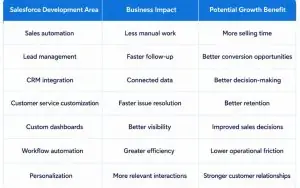
Salesforce Development: Business Value at a Glance
The business value of Salesforce development comes from connecting technology improvements with measurable operational outcomes.
Salesforce Development vs. Out-of-the-Box Salesforce
Not every business needs custom development across the board. The comparison below is meant to clarify where standard functionality is often sufficient and where development typically adds real value.
| Area | Out-of-the-Box Salesforce | Salesforce Development |
| Standard workflows | Available | Can be customized further |
| Business-specific processes | Limited by standard functionality | Can be tailored |
| Integrations | Supported through available options | Can support custom integration requirements |
| User experience | Standard | Can be customized |
| Automation | Built-in capabilities | Can be extended |
| Scalability | Strong | Can be adapted to evolving requirements |
When Does Your Business Need Salesforce Development Services?
A few signs tend to show up consistently in businesses that would benefit from development work:
- Teams rely heavily on spreadsheets outside Salesforce to track information the CRM should handle
- Employees manually repeat the same data-entry or record-update tasks
- Multiple systems contain disconnected pieces of the same customer’s information
- Standard Salesforce functionality can’t support a required business workflow
- Sales and service teams don’t have a shared, unified view of the customer
- Business processes have grown too complex for basic configuration to handle
- The company is expanding and needs CRM processes that can scale with it
If several of these sound familiar, there’s likely more value sitting inside the existing Salesforce investment than the business is currently getting out of it.
How to Choose the Right Salesforce Development Partner
Choosing a development partner is as important as the development work itself. A few areas worth evaluating:
- Salesforce expertise — hands-on experience across relevant clouds and tools, not just general CRM knowledge
- Development capabilities — proven ability to work with Apex, LWC, APIs, and custom application development, not just configuration
- Integration experience — a track record connecting Salesforce with the kinds of systems your business relies on
- Security and data considerations — a clear approach to data protection, access controls, and compliance requirements
How M40Tech Helps Businesses Get More From Salesforce
M40Tech helps businesses extend Salesforce around their sales, service, and operational requirements through Salesforce development, consulting, integration, implementation, and ongoing support.
Its Salesforce capabilities can support organizations that need to:
- Build custom Salesforce functionality for business-specific processes
- Automate repetitive sales and service workflows
- Integrate Salesforce with ERP, marketing, ecommerce, and other business systems
- Customize Sales Cloud and Service Cloud environments
- Migrate and organize customer data
- Develop solutions that can scale with changing business requirements
- Improve the usability and effectiveness of existing Salesforce implementations
The focus is not on adding customization for its own sake. M40Tech works to identify where Salesforce can remove operational bottlenecks, improve data visibility, and support more efficient customer and revenue processes.
For businesses evaluating Salesforce development, the right approach is to start with the business problem, determine the desired outcome, and then decide whether configuration, automation, integration, or custom development is the most appropriate solution.
Conclusion
Salesforce development helps businesses extend the platform beyond standard functionality through automation, integrations, and custom workflows. When aligned with business goals, these improvements can support better productivity, customer experiences, and long-term growth.
Businesses looking to maximize their Salesforce investment can work with an experienced Salesforce development partner like M40Tech to build solutions that match their operational needs.
Frequently Asked Questions
1. What is Salesforce Development?
Salesforce development is the process of extending the Salesforce platform to support business requirements that cannot be fully addressed through standard functionality. It can involve technologies and tools such as Apex, Lightning Web Components (LWC), APIs, Flow, custom applications, and integrations.
2. How can Salesforce development increase revenue?
Salesforce development can support revenue growth by improving lead management, automating sales processes, connecting customer data, supporting relevant upselling and cross-selling opportunities, improving sales productivity, and helping teams deliver better customer experiences.
3. Which Salesforce development services does M40Tech provide?
M40Tech provides Salesforce development and related services including custom Salesforce development, Salesforce integration, implementation, migration, automation, Sales Cloud and Service Cloud solutions, managed services, and Salesforce consulting.