



If your Salesforce org is still running on Classic in 2026, you’re facing a reality that’s harder to ignore with each passing quarter. The decision to migrate from Salesforce Classic to Lightning has evolved from an optional interface upgrade into a strategic imperative that impacts your organization’s security posture, innovation capacity, talent pipeline, and competitive positioning.
Salesforce has been signaling this direction for over a decade. Lightning Experience launched in 2015 as a modern, component-based alternative to the Classic interface. Since then, the gap between the two platforms has widened dramatically. In 2026, Classic sits in maintenance mode — receiving only critical security patches with no new features, no AI capabilities, and a shrinking ecosystem of compatible applications and integrations.
This is where expert guidance becomes critical.
Companies like M40Tech specialize in helping businesses seamlessly transition from Classic to Lightning, ensuring minimal disruption, optimized performance, and future-ready architecture. From audit and migration planning to customization and post-migration support, having the right partner can turn a complex transition into a strategic advantage.
This guide provides a comprehensive, in-depth analysis of the Classic-to-Lightning migration landscape. Whether you’re a Salesforce administrator evaluating the scope of the transition, a CTO building a business case for investment, or a project manager planning the rollout, this document covers everything you need to make informed decisions and execute with confidence.
Why Migrate from Salesforce Classic to Lightning?
The question is no longer whether to migrate, but how quickly you can execute the transition without disrupting operations. Here are the most compelling reasons organizations are prioritizing this migration in 2026.
2.1 AI and Automation Are Lightning-Exclusive
Salesforce’s entire generative AI stack — Einstein Copilot, AI-powered Flow recommendations, predictive lead scoring, and intelligent case routing — runs exclusively on Lightning. Classic users are completely locked out of the AI revolution that’s redefining CRM productivity. This isn’t just about missing a feature; it’s about missing an entirely new layer of intelligence that automates repetitive tasks, surfaces actionable insights, and enables your team to focus on high-value activities.
2.2 Classic Is in Maintenance Mode
Salesforce has officially stopped developing new features for Classic. The platform receives only critical security fixes, and even those are being scaled back. This means every Salesforce release (three times per year) delivers innovation exclusively to Lightning users, while Classic orgs fall further behind. The compounding effect of this gap over multiple release cycles is significant.
2.3 Shrinking Talent Pool
New Salesforce administrators, developers, and consultants are trained exclusively on Lightning. Classic expertise is becoming rare and expensive. Organizations that remain on Classic face higher hiring costs, longer onboarding timelines, and the risk of key-person dependency as experienced Classic administrators retire or move on.
2.4 Security and Compliance Risks
Lightning includes modern security features that Classic lacks, including LockerService for component isolation, Content Security Policy (CSP) enforcement, enhanced session management, and improved data protection controls. As global compliance requirements tighten (GDPR, CCPA, HIPAA, SOC 2), Classic’s aging security model creates increasing audit risk and potential regulatory exposure.
2.5 Integration Ecosystem Alignment
The AppExchange ecosystem has decisively shifted to Lightning. Over 85% of new managed packages are Lightning-native, and many established apps have dropped Classic compatibility entirely. This means staying on Classic doesn’t just limit your current integrations — it actively shrinks your available ecosystem with every quarter.
2.6 Superior User Experience
Lightning’s component-based architecture delivers a fundamentally better user experience. Dynamic Forms allow admins to build context-aware page layouts without code. Dynamic Actions enable conditional button visibility based on record data. Kanban views, split views, and in-line editing reduce the number of clicks required to complete common tasks. The result is faster adoption, higher satisfaction, and measurably better productivity.
2.7 Developer Productivity and Modern Tooling
Lightning Web Components (LWC) use modern web standards (HTML, CSS, JavaScript) that are familiar to any frontend developer. The Lightning App Builder provides a visual, drag-and-drop interface for page construction. DevOps Center enables source-driven development and change tracking. These tools dramatically reduce development time and make your Salesforce org easier to maintain.
Classic vs Lightning: A Detailed Comparison
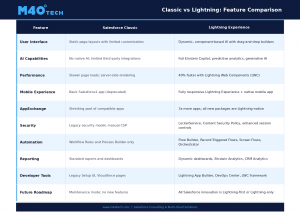
Understanding the specific differences between Classic and Lightning helps stakeholders grasp the full scope of what the migration unlocks. The following table provides a feature-by-feature comparison across the most critical dimensions.
3.1 What Classic Still Does Well
To be fair, Classic isn’t entirely without merit for certain legacy use cases. Some organizations appreciate the simplicity of Classic’s static page layouts for highly standardized, data-entry-heavy workflows. Users who have spent years in Classic have deep muscle memory that translates to efficiency within that interface. However, these advantages are diminishing rapidly as Lightning’s flexibility and performance improvements close even these narrow gaps.
3.2 Where Lightning Delivers Transformative Value
- Build pages from reusable components that can be mixed, matched, and updated independently.Composable UI:
- Every Lightning page can surface Einstein predictions, recommendations, and automated actions.AI-Native:
- Lightning Experience is responsive by design, and the Salesforce mobile app is fully Lightning-powered.Mobile-First:
- Replace complex Apex triggers with declarative Flows that business users can understand and modify.Flow-Powered Automation:
- Activity timelines, Chatter integration, and in-context communication reduce context-switching.Real-Time Collaboration:
Cost and ROI Reality
Migration requires investment, and stakeholders rightfully want to understand the financial picture. The key insight is that the cost of staying on Classic is often higher than the cost of migrating — it’s just less visible because it’s distributed across maintenance overhead, missed opportunities, and accumulating technical debt.
Cost Comparison: Classic vs Lightning
| Cost Category | Staying on Classic | Migrating to Lightning |
| Maintenance | Rising dual-maintenance overhead, legacy custom code upkeep | Single platform maintenance; modern, supported codebase |
| Hiring & Training | Shrinking Classic talent pool; higher salaries | Larger talent pool trained on Lightning; faster onboarding |
| Productivity | Manual processes; limited automation | AI-assisted workflows; 25-30% productivity gains reported |
| Integration | Growing incompatibilities; workaround costs | Native connectors; modern APIs; seamless AppExchange ecosystem |
| Opportunity Cost | Cannot leverage AI, Data Cloud, Industry Clouds | Full access to Salesforce innovation roadmap |
| 5-Year TCO Trend | Increasing year over year | Decreasing after initial migration investment |
The Hidden Costs of Staying on Classic
- Organizations that partially adopt Lightning while keeping Classic face the highest costs — maintaining two sets of customizations, page layouts, and user training materials.Dual-Maintenance Overhead:
- Every workaround built to compensate for Classic’s limitations adds to a growing backlog that becomes more expensive to resolve over time.Technical Debt Accumulation:
- Classic-experienced professionals command a scarcity premium, while Lightning professionals are more readily available and often more cost-effective.Talent Premium:
- The inability to leverage AI-powered features, Data Cloud integrations, and Industry Cloud capabilities translates directly into lost revenue opportunities and competitive disadvantage.Opportunity Cost:
- As Classic’s ecosystem shrinks, organizations become increasingly dependent on a smaller set of vendors and custom solutions, reducing negotiating power.Vendor Lock-In Risk:
Migration Investment Breakdown
A typical migration investment includes the following components:
- 10-15% of total budget — comprehensive org audit, stakeholder alignment, and roadmap development.Discovery and Assessment:
- 15-20% of total budget — Lightning page design, component architecture, security model redesign.Design and Architecture:
- 35-40% of total budget — LWC development, Flow migration, Visualforce conversion, integration updates.Development and Build:
- 15-20% of total budget — UAT, regression testing, performance testing, security validation.Testing and Validation:
- 10-15% of total budget — phased rollout, training, go-live support, optimization.Deployment and Change Management:
Expected ROI Timeline
Most organizations begin seeing measurable ROI within 6-12 months of completing their Lightning migration. Productivity gains are typically the first to materialize (within 30-60 days of adoption), followed by reduced maintenance costs (3-6 months), and strategic benefits like AI adoption and improved integration capabilities (6-12 months). Organizations with well-executed change management programs report faster ROI realization across all categories.
5. Implementation Framework: A Phased Approach
A successful migration requires a structured, phased approach that balances speed with risk management. The following framework has been refined across hundreds of successful migrations and represents industry best practices for organizations of all sizes.
| Phase | Activities | Deliverables | Timeline |
| Phase 1: Discovery | Org audit, stakeholder interviews, readiness assessment, customization catalog | Readiness Report, Risk Assessment, Migration Roadmap | 2-3 Weeks |
| Phase 2: Design | Lightning page design, component architecture, data model review, security mapping | Solution Design Document, UX Wireframes, Architecture Blueprint | 3-4 Weeks |
| Phase 3: Build | LWC development, Flow migration, Visualforce conversion, integration rebuild | Configured Lightning Org, Custom Components, Migrated Automations | 6-10 Weeks |
| Phase 4: Test | UAT, regression testing, performance testing, security validation, device testing | Test Reports, Bug Fix Log, Performance Benchmarks | 2-4 Weeks |
| Phase 5: Deploy | Phased rollout by user group, change management execution, go-live support | Deployment Plan, Training Materials, Go-Live Checklist | 2-3 Weeks |
| Phase 6: Optimize | User feedback collection, performance tuning, layout refinement, adoption monitoring | Optimization Report, Adoption Metrics, Enhancement Backlog | Ongoing (90 days) |
Phase 1: Discovery and Assessment (Weeks 1-3)
The discovery phase is the foundation of a successful migration. Rushing past this step is the single most common cause of migration delays and budget overruns.
- to establish a baseline assessment of your org’s compatibility.Run the Salesforce Lightning Readiness Report
- Apex trigger, JavaScript button, custom component, and third-party integration.Catalog every Visualforce page,
- to understand department-specific workflows, pain points, and priorities.Conduct stakeholder interviews
- that require significant rework (complex Visualforce pages, heavily customized JavaScript buttons, legacy API integrations).Identify high-risk customizations
- including custom objects, record types, sharing rules, and automation dependencies.Assess data model complexity,
- including permission sets, profiles, sharing rules, and role hierarchy.Document the current security model
Phase 2: Design and Architecture (Weeks 4-7)
The design phase translates discovery findings into a concrete implementation plan. This is where architectural decisions are made that will determine the long-term maintainability and scalability of your Lightning org.
- using Dynamic Forms and Dynamic Actions to improve upon (not merely replicate) Classic layouts.Design Lightning page layouts
- identifying reusable LWC components that serve multiple use cases.Plan the component architecture,
- converting Workflow Rules and Process Builders to Flows with clear documentation.Map the automation migration strategy,
- for Lightning, including LockerService configuration, CSP policies, and permission set groups.Design the security model
- for key user personas and validate with representative users before development begins.Create UX wireframes
Phase 3: Build and Configure (Weeks 8-17)
The build phase is where the migration plan becomes reality. Development should follow an iterative approach with regular checkpoints to catch issues early.
- to replace Visualforce pages and JavaScript buttons.Develop custom Lightning Web Components
- from Workflow Rules and Process Builder to Flow Builder, leveraging Record-Triggered Flows and Screen Flows.Migrate automation logic
- using Lightning-compatible APIs and event-driven architectures.Rebuild integrations
- in the Lightning App Builder with Dynamic Forms, Dynamic Actions, and conditional visibility rules.Configure Lightning pages
- to replace JavaScript buttons with Lightning-native functionality.Implement Quick Actions
Phase 4: Test and Validate (Weeks 18-21)
- with representative users from each department and role.Execute User Acceptance Testing (UAT)
- across all user profiles, permission sets, and device types.Perform regression testing
- to validate page load times, API response times, and system resource utilization.Conduct performance testing
- including LockerService behavior, CSP compliance, and data access patterns.Validate security controls
- to ensure consistent behavior across all supported platforms.Test cross-browser and mobile compatibility
Phase 5: Deploy and Go-Live (Weeks 22-24)
- beginning with a pilot group (typically IT, admin users, or a single department) before expanding org-wide.Execute a phased rollout
- including role-specific training sessions, quick reference guides, and video walkthroughs.Deploy change management activities,
- in each department to serve as first-line support and feedback collectors.Designate Lightning Champions
- for the first 48-72 hours post-go-live to address critical issues in real time.Establish a war room
- including login rates, feature usage, and support ticket volume.Monitor adoption metrics
Phase 6: Optimize (Ongoing — 90 Days)
- through surveys, champion check-ins, and usage analytics.Collect and analyze user feedback
- based on actual usage patterns and user suggestions.Refine page layouts and component configurations
- that emerge during real-world usage at scale.Address edge cases and bugs
- by analyzing page load times, query efficiency, and resource utilization.Monitor and improve performance
- including AI feature enablement, advanced Flow automation, and Data Cloud integration.Plan the next wave of enhancements,
Key Benefits of Migrating to Lightning
When you migrate from Salesforce Classic to Lightning, you unlock a comprehensive set of benefits that span user experience, productivity, security, and strategic capability. Here’s a detailed look at the most impactful advantages.
Enhanced Productivity and Efficiency
- allow admins to create context-aware interfaces that show only the fields and buttons relevant to each user’s current task, reducing clutter and cognitive load.Dynamic Forms and Dynamic Actions
- enable users to manage records more efficiently without navigating between multiple pages.Kanban views, split views, and in-line editing
- empowers admins to build and modify pages visually, reducing dependence on developers for routine UI changes.Lightning App Builder
- through Einstein surface the next-best action, recommended contacts, and predicted outcomes directly within the workflow.AI-powered suggestions
Full Access to AI and Automation
- Conversational AI assistant that can draft emails, summarize records, generate reports, and automate multi-step tasks through natural language.Einstein Copilot:
- Lead scoring, opportunity insights, and forecasting powered by machine learning models trained on your org’s data.Predictive Analytics:
- Visual automation tool that replaces the complexity of Workflow Rules, Process Builder, and many Apex triggers with a single, powerful declarative engine.Flow Builder:
- Coordinate multi-step, multi-user business processes across departments with built-in approval chains and escalation logic.Orchestrator:
Stronger Security and Compliance
- Isolates Lightning components in secure sandboxes, preventing cross-component data leakage and ensuring component integrity.LockerService:
- Enforces strict controls over which external resources can be loaded, protecting against XSS and injection attacks.Content Security Policy (CSP):
- Improved timeout controls, session fingerprinting, and multi-factor authentication integration.Enhanced Session Management:
- More granular and maintainable access control compared to Classic’s profile-based model.Permission Set Groups:
Improved Mobile Experience
Lightning Experience is responsive by design, and the Salesforce mobile app is fully Lightning-powered. Field teams, sales representatives, and service agents can access the full power of your CRM from any device, with consistent functionality and a modern interface that mirrors the desktop experience.
Future-Proof Architecture
- Lightning is the gateway to Salesforce’s unified data platform, enabling real-time customer profiles from any data source.Data Cloud Integration:
- Health Cloud, Financial Services Cloud, Manufacturing Cloud, and others are built on Lightning foundations.Industry Clouds:
- Event-driven architectures for real-time integrations that Classic cannot support.Platform Events and Change Data Capture:
- Next-generation compute and infrastructure capabilities available exclusively on Lightning.Salesforce Functions and Hyperforce:
Better Reporting and Analytics
Lightning delivers a significantly upgraded reporting experience with dynamic dashboards that refresh in real time, Einstein Analytics (CRM Analytics) for advanced data visualization, embedded charts and metrics on record pages, and report subscriptions with conditional alerting. These capabilities transform Salesforce from a data repository into an active decision-support system.
Common Migration Challenges and How to Overcome Them
No migration is without challenges. Acknowledging and planning for these common obstacles dramatically improves outcomes and reduces the risk of delays or budget overruns.
Visualforce and JavaScript Button Dependencies
Classic orgs often have extensive Visualforce pages and custom JavaScript buttons that don’t function in Lightning. These need to be individually assessed and either rebuilt as Lightning Web Components, replaced with Quick Actions and Flows, or deprecated if they’re no longer needed.
Solution: Conduct a comprehensive audit during the Discovery phase. Categorize each component by business criticality and usage frequency. Prioritize high-impact, high-usage components for LWC conversion, and identify opportunities to consolidate or eliminate redundant customizations.
Change Management and User Resistance
Users who have spent years in Classic develop deep familiarity with specific layouts, button placements, and navigation patterns. Without deliberate change management, even a technically flawless migration can fail due to user resistance and low adoption.
Solution: Start change management during the Discovery phase, not at go-live. Involve representative users in design decisions. Create role-specific training materials (not generic overviews). Designate Lightning Champions in each department. Build a feedback mechanism and demonstrate responsiveness to user concerns.
Data and Configuration Complexity
Complex page layouts, record types, sharing rules, validation rules, and automation built on Classic assumptions may need significant restructuring. The Salesforce Lightning Readiness Report catches many issues, but org-specific nuances often require manual investigation.
Solution: Supplement the Readiness Report with a manual audit of your most complex objects and processes. Pay special attention to cross-object automation, custom sharing rules, and any configuration that references Classic-specific features like S-Controls or legacy API versions.
Testing at Scale
Lightning’s component-based architecture behaves differently from Classic in edge cases, particularly around page load order, component visibility, and API behavior. Organizations that under-invest in testing often face a wave of post-go-live issues that erode user confidence.
Solution: Build a comprehensive test plan that covers every user profile, permission set, and device type. Include performance testing to validate page load times under realistic load conditions. Allocate 15-20% of the total migration budget to testing and validation.
Third-Party Integration Compatibility
Some legacy integrations may not be compatible with Lightning, particularly those that rely on Classic-specific APIs, URL hacking, or screen scraping techniques. Identifying these early prevents last-minute surprises.
Solution: Inventory all third-party integrations during Discovery. Contact vendors to confirm Lightning compatibility. For unsupported integrations, identify Lightning-native alternatives on the AppExchange or plan custom integration rebuilds.
Best Practices for a Successful Migration
These best practices are drawn from hundreds of successful migrations and represent the distilled wisdom of the Salesforce consulting community.
- The biggest mistake organizations make is replicating their Classic layouts exactly in Lightning. Instead, use the migration as an opportunity to rethink and improve your page designs, workflows, and data architecture.Don’t Recreate Classic in Lightning:
- Build early momentum by migrating departments or user groups that will benefit most from Lightning’s features with the least amount of customization rework.Start with High-Impact, Low-Complexity Areas:
- For small orgs, a well-crafted email series and training session may suffice. For enterprise orgs, budget for dedicated change management resources, executive sponsorship, and multi-month communication campaigns.Invest in Change Management Proportional to Scale:
- Run it early and often. It provides a baseline assessment and tracks your progress as you resolve compatibility issues.Leverage the Lightning Readiness Report:
- Migration is not the finish line. Plan a 90-day optimization sprint to refine layouts, address edge cases, enable additional Lightning features, and collect user feedback.Plan for Post-Migration Optimization:
- Maintain a comprehensive migration log that captures decisions, known issues, workarounds, and lessons learned. This documentation is invaluable for future enhancements and troubleshooting.Document Everything:
- Validate all changes in a full sandbox before touching production. Use partial sandboxes for development and full sandboxes for UAT and performance testing.Use a Sandbox Strategy:
- Over-communicate the why, when, and how of the migration. Users who understand the business reasons for the change are significantly more likely to embrace it.Communicate Relentlessly:
How m40tech Helps Your Salesforce Lightning Migration Journey
At m40tech, we’ve guided organizations of every size through successful Lightning migrations — from lean startups to complex multi-org enterprises. Our approach is built on a simple principle: migration isn’t just about moving screens; it’s about transforming how your teams work with Salesforce.
When you partner with m40tech to migrate from Salesforce Classic to Lightning, you get a team that understands the full Salesforce ecosystem — not just one cloud.
Multi-Cloud Expertise
Our consultants hold certifications across the full Salesforce portfolio, including Sales Cloud, Service Cloud, Marketing Cloud, Experience Cloud, Commerce Cloud, and Data Cloud. This breadth matters because migration isn’t just about the UI — it’s about ensuring cross-cloud dependencies, integrations, and data flows are preserved and optimized throughout the transition. We identify and resolve cross-cloud compatibility issues before they become go-live blockers.
AI-Ready Architecture
We don’t just migrate your org to Lightning — we prepare it for the future. Every migration engagement includes an AI readiness assessment, ensuring your data model, automation architecture, and security configuration are optimized for Einstein Copilot, predictive analytics, and generative AI features. We help you unlock the full value of your Salesforce investment from day one.
Custom Component Rebuilds
Our developers specialize in converting legacy Visualforce pages and JavaScript buttons into modern Lightning Web Components. We don’t just recreate the old functionality — we rethink and improve it, leveraging LWC’s performance advantages, modern design patterns, and reusable component architecture to deliver a superior user experience.
End-to-End Change Management
We believe that technology migration without change management is just a configuration change. Our change management practice covers stakeholder alignment, executive sponsorship cultivation, role-specific training programs, Lightning Champion programs, communication campaigns, and post-go-live feedback systems. We manage the human side of migration with the same rigor as the technical side.
Security and Compliance Focus
Every m40tech migration engagement includes a comprehensive security audit covering permission models, sharing rules, data access patterns, API security, and compliance requirements. We ensure your Lightning org meets or exceeds your compliance standards from day one, and we provide documentation to support your audit needs.
Post-Migration Optimization
Our engagement doesn’t end at go-live. Every m40tech migration includes a 90-day optimization sprint where we refine page layouts, address edge cases, enable advanced Lightning features, monitor adoption metrics, and build an enhancement backlog prioritized by user feedback and business impact. This ensures your migration investment delivers maximum long-term value.
Final Thoughts
The window to migrate from Salesforce Classic to Lightning on your own terms is narrowing. In 2026, migration is no longer an upgrade — it’s the baseline for a secure, intelligent, and scalable Salesforce org.
The organizations that thrive will be the ones that treat this transition not as a technical chore, but as a strategic opportunity to modernize workflows, embrace AI, and set the foundation for the next decade of CRM innovation.
Whether you’re just starting to evaluate the move or you’re stuck mid-migration, the right partner makes all the difference. m40tech is here to help you get it right — the first time.
Frequently Asked Questions (FAQs)
Q: How long does it take to migrate from Salesforce Classic to Lightning?
A: The timeline varies significantly based on org complexity. A small org with minimal customizations might complete the migration in 4-6 weeks. A mid-size org with moderate customizations typically requires 12-16 weeks. Large enterprise orgs with extensive Visualforce pages, complex integrations, and thousands of users may need 6-12 months for a full, phased migration. The Discovery phase is the best way to establish a realistic timeline for your specific org.
Q: Will we lose any data during the migration from Classic to Lightning?
A: No. The migration from Classic to Lightning is a user interface transition, not a data migration. Your data, records, custom objects, and relationships remain intact throughout the process. The changes are to how users interact with the data (page layouts, navigation, components), not the underlying data model. That said, it’s always best practice to take a full backup before any major org change.
Q: Can we run Classic and Lightning simultaneously during the transition?
A: Yes. Salesforce allows organizations to run Classic and Lightning in parallel during the migration. You can enable Lightning for specific user profiles or permission sets while keeping others on Classic. This phased approach is actually the recommended best practice, as it allows you to migrate department by department, collect feedback, and refine the Lightning experience iteratively before a full org-wide rollout.
Q: What happens to our Visualforce pages and custom JavaScript buttons after migration?
A: Visualforce pages will continue to function in Lightning but may render inside an iframe with a Classic-style appearance, which can create a disjointed user experience. Custom JavaScript buttons are not supported in Lightning and must be replaced with Quick Actions, Flows, or Lightning Web Components. During the Discovery phase, we catalog every Visualforce page and JavaScript button, assess business criticality, and recommend the most appropriate Lightning-native replacement for each.
Q: Is it possible to switch back to Classic after migrating to Lightning?
A: Technically, Salesforce still allows individual users to toggle between Lightning and Classic in most orgs. However, this is not recommended as a long-term strategy because it creates inconsistent user experiences, complicates training and support, and defeats the purpose of the migration. A well-executed migration with proper change management should make the Classic toggle unnecessary for the vast majority of users.
Q: How much does a typical Classic to Lightning migration cost?
A: Migration costs depend on org size, customization complexity, number of users, and the scope of change management required. Small orgs might spend $15,000-$40,000, mid-size orgs typically invest $50,000-$150,000, and large enterprise migrations can range from $200,000 to $500,000 or more. However, these costs should be weighed against the ongoing cost of staying on Classic, which includes higher maintenance overhead, talent premiums, opportunity costs, and growing technical debt. Most organizations see positive ROI within 6-12 months of completing the migration.

'%3e%3cpath%20d='M18.49219,2.99414c-0.14781,0.00341%20-0.28653,0.07206%20-0.37891,0.1875l-5.05273,6.13477l-4.00391,-5.54492c-0.35,-0.484%20-0.91081,-0.77148%20-1.50781,-0.77148h-3.4707c-0.658,0%20-1.0393,0.7463%20-0.6543,1.2793l6.44141,8.91992l-5.75195,6.98242c-0.11376,0.13816%20-0.14516,0.32652%20-0.08238,0.49411c0.06278,0.16759%200.21021,0.28896%200.38674,0.31838c0.17653,0.02942%200.35535,-0.03759%200.46908,-0.17577l5.58398,-6.78125l4.47266,6.19141c0.35,0.484%200.91081,0.77148%201.50781,0.77148h3.4707c0.658,0%201.0393,-0.7463%200.6543,-1.2793l-6.9082,-9.56445l5.21875,-6.33789c0.12815,-0.15036%200.15576,-0.36207%200.07046,-0.54026c-0.0853,-0.1782%20-0.26751,-0.28947%20-0.46499,-0.28395zM4.45508,4h3.0957c0.275,0%200.53431,0.13247%200.69531,0.35547l11.29883,15.64453h-3.09375c-0.275,0%20-0.53431,-0.13247%20-0.69531,-0.35547z'%3e%3c/path%3e%3c/g%3e%3c/g%3e%3c/svg%3e)
'%3e%3cpath%20d='M8,3c-2.757,0%20-5,2.243%20-5,5v8c0,2.757%202.243,5%205,5h8c2.757,0%205,-2.243%205,-5v-8c0,-2.757%20-2.243,-5%20-5,-5zM8,5h8c1.654,0%203,1.346%203,3v8c0,1.654%20-1.346,3%20-3,3h-8c-1.654,0%20-3,-1.346%20-3,-3v-8c0,-1.654%201.346,-3%203,-3zM17,6c-0.55228,0%20-1,0.44772%20-1,1c0,0.55228%200.44772,1%201,1c0.55228,0%201,-0.44772%201,-1c0,-0.55228%20-0.44772,-1%20-1,-1zM12,7c-2.757,0%20-5,2.243%20-5,5c0,2.757%202.243,5%205,5c2.757,0%205,-2.243%205,-5c0,-2.757%20-2.243,-5%20-5,-5zM12,9c1.654,0%203,1.346%203,3c0,1.654%20-1.346,3%20-3,3c-1.654,0%20-3,-1.346%20-3,-3c0,-1.654%201.346,-3%203,-3z'%3e%3c/path%3e%3c/g%3e%3c/g%3e%3c/svg%3e)
'%3e%3cpath%20d='M5,3c-1.105,0%20-2,0.895%20-2,2v14c0,1.105%200.895,2%202,2h14c1.105,0%202,-0.895%202,-2v-14c0,-1.105%20-0.895,-2%20-2,-2zM5,5h14v14h-14zM7.7793,6.31641c-0.857,0%20-1.37109,0.51517%20-1.37109,1.20117c0,0.686%200.51416,1.19922%201.28516,1.19922c0.857,0%201.37109,-0.51322%201.37109,-1.19922c0,-0.686%20-0.51416,-1.20117%20-1.28516,-1.20117zM6.47656,10v7h2.52344v-7zM11.08203,10v7h2.52344v-3.82617c0,-1.139%200.81264,-1.30273%201.05664,-1.30273c0.244,0%200.89649,0.24473%200.89649,1.30273v3.82617h2.44141v-3.82617c0,-2.197%20-0.97627,-3.17383%20-2.19727,-3.17383c-1.221,0%20-1.87226,0.40656%20-2.19726,0.97656v-0.97656z'%3e%3c/path%3e%3c/g%3e%3c/g%3e%3c/svg%3e)